

What is the best IDE for C++ development in 2026?
The best IDE for C++ depends on your platform and scale: Visual Studio 2026 remains the king for Windows and Game Dev, CLion is the premier choice for cross-platform professional work, and VS Code is the leading lightweight alternative for fast prototyping and cloud development.
C++ development has entered a new era.
Choosing the right IDE for cpp development in 2026 is no longer just about syntax highlighting and a "Run" button. As C++23 becomes the industry standard and initial C++26 features begin to land in compilers, the demands on your development environment have shifted. Modern C++ development now requires deep integration with AI coding assistants, robust support for complex build systems like CMake and Meson, and seamless remote development capabilities.
What is an IDE for C++?
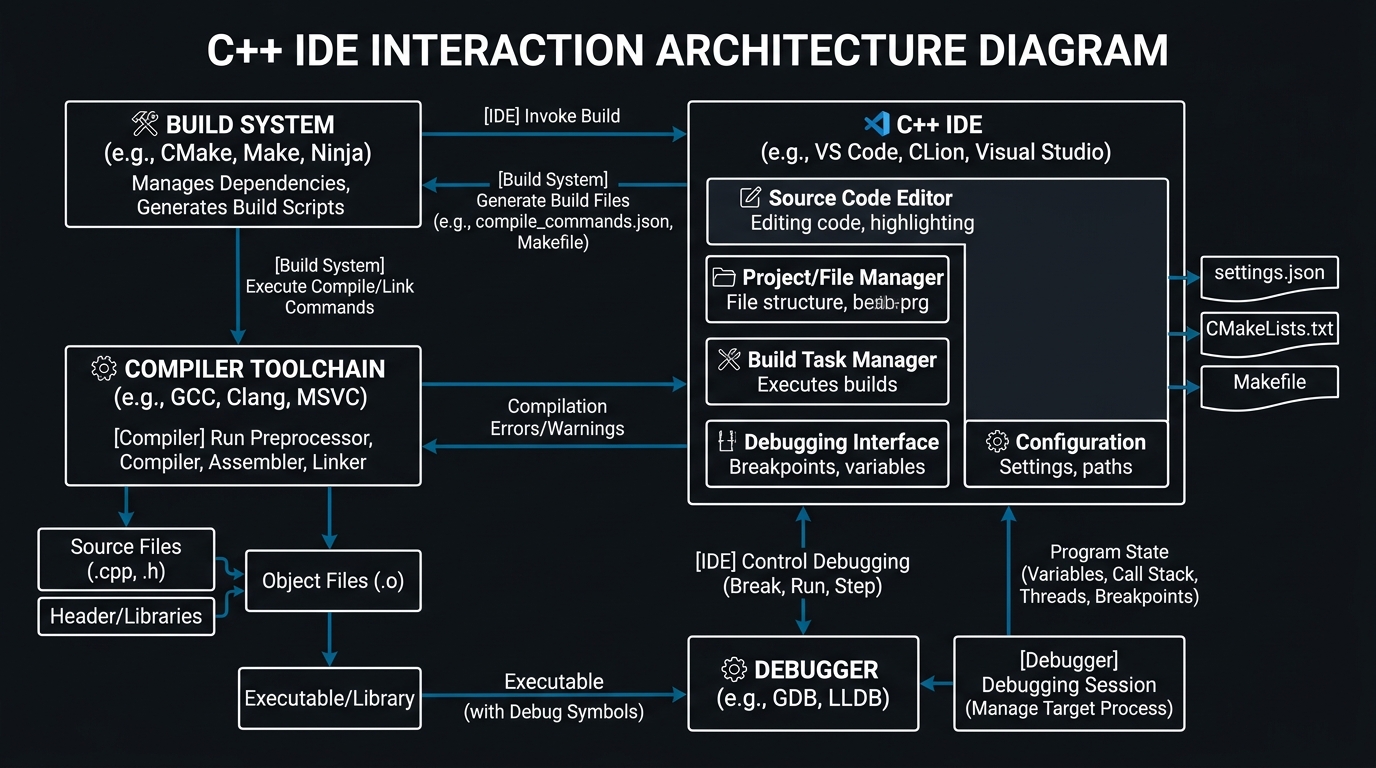
An Integrated Development Environment (IDE) for C++ is a software suite that consolidates the essential tools required for software development into a single graphical user interface. Unlike a simple text editor, a dedicated **ide for cpp** understands the language's complex grammar, template metaprogramming, and memory management nuances.
Core Components of a Modern C++ IDE:
- Advanced Code Editor: Features like IntelliSense (Visual Studio) or Context-aware completion (CLion) that go beyond basic autocomplete.
- Compiler Integration: Native support for GCC, Clang, and MSVC, allowing for one-click builds and complex optimization flagging.
- Debugger: A sophisticated interface for GDB, LLDB, or the Windows Debugger, providing memory inspection, call stack navigation, and conditional breakpoints.
- Build System Support: Deep integration with CMake, Ninja, Make, and MSBuild.
- Static Analysis: Real-time linting and "red squiggly" warnings for potential memory leaks, uninitialized variables, and modern C++ best practice violations.
Key Takeaways
- A true C++ IDE must handle the semantic complexity of the language.
- Build system integration (CMake/Ninja) is critical in 2026.
- Modern IDEs are now 'AI-augmented' by default.
Top-Rated IDEs for C++ in 2026
The landscape of cpp ides has bifurcated into two main categories: the "Heavyweights" (Visual Studio, CLion) and the "Lightweight Challengers" (VS Code, Neovim). In 2026, the gap between these is closing, but the distinction remains important for project-scale considerations.
| IDE | Best For | Platform | Price |
|---|---|---|---|
| Visual Studio 2022/2026 | Windows Desktop, Game Dev | Windows | Free / Paid |
| CLion | Cross-platform, Linux, Embedded | Windows, macOS, Linux | Paid |
| VS Code | WebAssembly, Fast Prototyping | Cross-platform | Free |
| Xcode | macOS/iOS Development | macOS | Free |
| Qt Creator | GUI Applications | Cross-platform | Free / Paid |
Deep Dive: Visual Studio 2026 for C++ Development
For Windows developers, Visual Studio remains the undisputed king of best c++ ides. In its 2026 iteration, Microsoft has doubled down on C++ performance, significantly reducing the time it takes to open large solutions (like the Chromium project or Unreal Engine) and improving the responsiveness of its IntelliSense engine.
Why Visual Studio Wins on Windows:
- The Best Debugger in the World: Features like "Step Back" debugging, advanced memory profiling, and the "Diagnostic Tools" window.
- Unreal Engine Integration: Specialized tooling for Unreal Engine Blueprints and C++ synchronization.
- vcpkg Integration: Native support for Microsoft's C++ library manager.
⚠️ Resource Intensive
Visual Studio is a heavy application. For large C++ projects, we recommend at least 32GB of high-speed RAM and an NVMe SSD to maintain a responsive UI.
CLion: The Power of JetBrains for C++
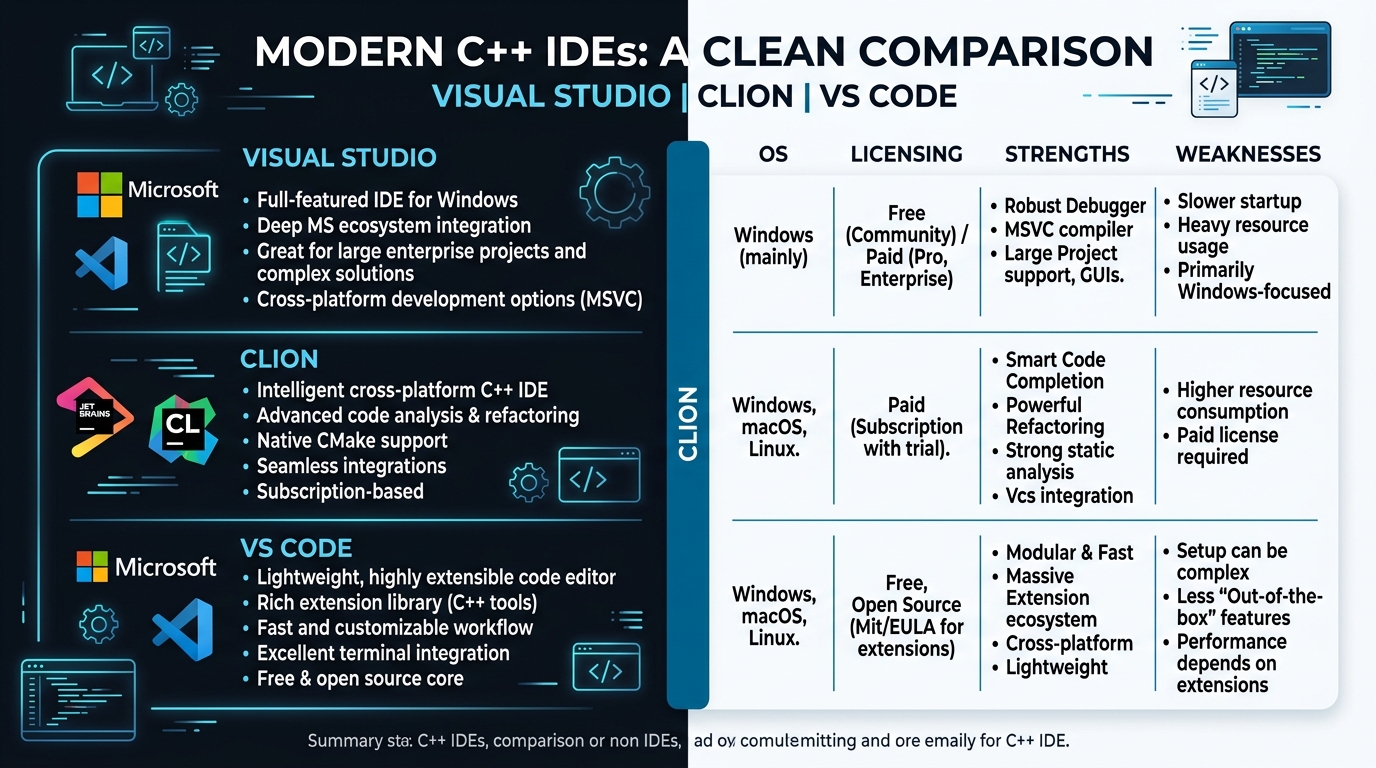
If you are working on a Mac or Linux machine, or if you simply prefer the JetBrains ecosystem, CLion is arguably the best cpp ides for cross-platform work. CLion's standout feature is its "Deep Code Insight." Because it performs a full semantic analysis of your code in the background, it can suggest refactorings that other IDEs miss.
- CMake as a First-Class Citizen: Uses CMake as its native project format.
- Embedded Development: Native support for STM32, ESP32, and Arduino platforms.
- Remote Development: Run the heavy lifting on a remote server via JetBrains Gateway.
Visual Studio Code: The Modern, Lightweight Alternative
While technically a text editor, with the right extensions, VS Code transforms into a formidable cpp ide. In 2026, the Microsoft C++ Extension Pack has reached a level of maturity where it can handle moderately sized projects with ease.
The "Lightweight" Advantage: Speed, customizability, and leading support for WebAssembly (Wasm) workflows via Emscripten.
Key Takeaways
- VS Code is ideal for fast prototyping and distributed teams.
- Dev Containers allow for perfectly reproducible C++ environments.
- It is the king of the 'Cloud IDE' movement.
Setting up your C++ environment: A Step-by-Step Guide
Setting up a modern C++ environment in 2026 has become significantly more streamlined, but there are still several critical steps to ensure you're working with the latest standards and most efficient toolchains. Gone are the days of manually downloading compiled DLLs and modifying global PATH variables. Today's development environments rely on containerization and rigorous package management.
1. Choosing Your Compiler
Your compiler is the heart of your development setup. In 2026, you generally choose between three major options: MSVC (Windows), GCC (Linux/Embedded), and Clang (macOS/Modern Tooling). Clang has seen massive adoption across the industry due to its modular design, incredible static analysis capabilities via clang-tidy, and its lightning-fast compilation times compared to older legacy GCC configurations.
2. Integrated Package Managers: vcpkg and Conan
Historically, one of the biggest pain points in C++ development was dependency management. In 2026, using a package manager is mandatory for professional workflows. The industry has largely coalesced around two major players: vcpkg (backed by Microsoft) and Conan. An ideal ide for cpp must have native integration with at least one of these. When evaluating your workflow, ensure that your chosen IDE can automatically resolve #include directives by dynamically pulling the required libraries from your package manager's local cache or network artifactory. This eliminates the infamous "Linker Error: Unresolved External Symbol" nightmare that plagued developers for decades.
3. Installing the Toolchain
On Windows, use the Visual Studio Installer and ensure you select the "Desktop development with C++" workload, along with the Windows 11 SDK. On Linux distributions, you can quickly bootstrap an environment running sudo apt install build-essential cmake gdb ninja-build. On macOS, running xcode-select --install will pull down the Apple Clang toolchain, though many professionals prefer installing the vanilla LLVM Clang via Homebrew for stricter C++26 standard compliance.
4. Configuring Your Build System
Ensure your IDE points to the correct CMake executable. CMake is the absolute industry-standard build system in 2026, generating the final Makefiles or Ninja build scripts. Modern IDEs like CLion and Visual Studio allow you to natively open a CMakeLists.txt folder, bypassing the need to ever manually generate a .sln or .xcworkspace file.
Advanced Debugging Techniques in Modern C++
Debugging C++ has come a long way from simply dropping std::cout statements throughout your codebase. In 2026, professional developers leverage sophisticated techniques to track down complex bugs involving multi-threading race conditions, memory corruption, and erratic pointer arithmetic.
Time-Travel Debugging (TTD)
Available primarily in Enterprise versions of Visual Studio and modern Linux debuggers (via tools like rr), Time-Travel Debugging represents a paradigm shift. TTD records the entire execution of your application at the CPU instruction level. When a crash occurs, you can literally "step backward" in time to observe exactly which variable modification corrupted the memory layout, completely eliminating the need to repeatedly restart the application to reproduce race conditions.
Address Sanitizer (ASan) and Memory Tooling
The best ide for cpp integrates deeply with LLVM's sanitizer suite. Address Sanitizer (ASan) and Thread Sanitizer (TSan) detect memory errors exactly when they happen—such as out-of-bounds array access, use-after-free bugs, and double-free anomalies. Modern IDEs will instantly highlight the exact line of code that violated memory safety in real-time, drastically reducing the time spent hunting down silent segmentation faults.
Data Breakpoints and Advanced Watch Expressions
Instead of breaking execution on a specific line of code, Data Breakpoints allow the debugger to pause execution the exact millisecond a specific hardware memory address is modified. This is an invaluable tool when tracking down elusive state changes in highly complex Object-Oriented hierarchies or game engine ECS (Entity Component System) architectures.
C++ Development for Game Engines: Unreal vs Unity
Game development is one of the primary drivers for C++ innovation. In 2026, the choice of IDE is often dictated by the engine you use.
Unreal Engine 5/6
For the best experience, Visual Studio is the recommendation. Microsoft and Epic Games have collaborated to create specialized extensions that allow Visual Studio to understand Unreal's custom macro systems.
Unity
While Unity primarily uses C#, its high-performance backends are often written in C++ via the Burst Compiler. For developers working on the native side of Unity, CLion or VS Code are popular choices.
AI-Powered C++ Development: The New Paradigm
In 2026, AI is no longer a gimmick; it's a core part of the best cpp ide experience. Compiling C++ can be notoriously slow, and template metaprogramming errors are famously cryptic. Large Language Models (LLMs) and local AI copilots have fundamentally changed the ergonomics of writing systems-level code.
Advanced AI Code Generation
Tools like GitHub Copilot for C++ and JetBrains AI Assistant can now reliably generate complex boilerplate. Whether you are defining the "Rule of Five" (Destructor, Copy Constructor, Copy Assignment, Move Constructor, Move Assignment) or generating extremely verbose SFINAE template constraints, AI assistants dramatically accelerate mundane typing tasks. Furthermore, AI has become exceptionally adept at interpreting C++23 Concepts, ensuring that generic code is strictly type-checked at compile time.
AI-Native IDEs: The Rise of Cursor
While traditional IDEs map AI onto legacy architectures via plugins, 2026 has seen the rapid adoption of AI-native environments like Cursor. Built on top of the VS Code execution engine, Cursor can perform multi-file C++ refactorings natively. When changing the signature of a virtual function deep in a base class, Cursor will automatically ripple the changes across all derived classes throughout the entire project context, understanding the semantic hierarchy of the C++ objects rather than just performing a blind text search-and-replace.
Deciphering Compiler Errors
Perhaps the most celebrated AI integration in the C++ world is localized error translation. When GCC or Clang outputs hundreds of lines of impenetrable template instantiation errors because a single const qualifier was missing, AI-driven IDE panels instantly parse the terminal output and provide a human-readable explanation of exactly which type constraint failed, alongside a one-click fix implementation.
How to Choose the Right IDE for Your C++ Project
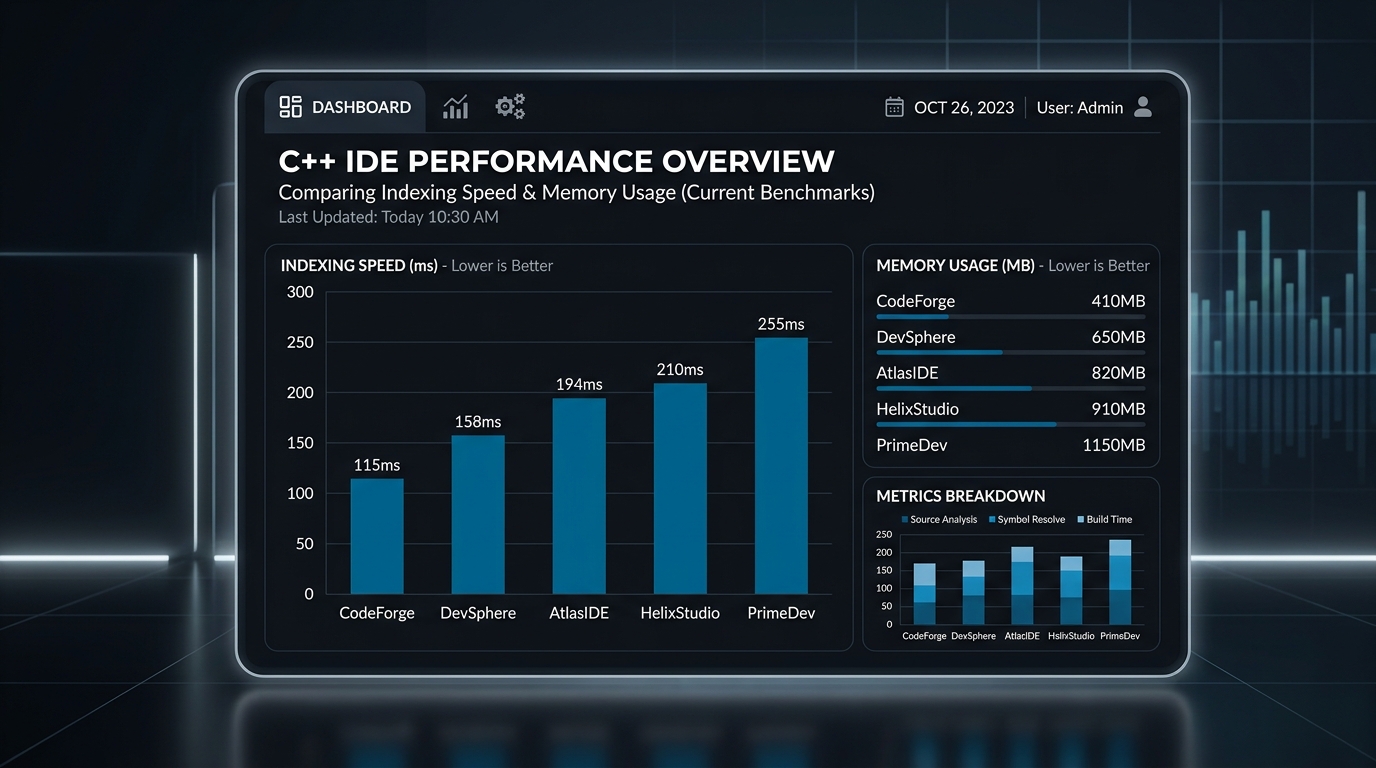
To choose the best c++ ide for your specific needs, you must holistically evaluate your hardware, your team structure, and your deployment targets. Ask yourself these critical questions:
1. What is my target platform?
If you are developing a DirectX12 game engine exclusively for Windows and Xbox, Visual Studio 2026 is unparalleled. Its native integration with the Windows SDK and DirectX debugging tools cannot be matched. However, if you are building an embedded IoT firmware running on Linux, CLion provides a vastly superior experience with robust remote-GDB debugging capabilities via SSH.
2. How large is the codebase?
Scaling matters. For codebases exceeding five million lines of code (such as custom Chromium forks or AAA game engines), the indexing systems built into Visual Studio Professional or ReSharper C++ are mandatory to prevent UI lockups. For microservices, small libraries, or Wasm modules, firing up VS Code with the clangd extension takes less than a second and consumes minimal battery life.
3. What is my team's budget?
Licensing costs are a valid enterprise concern. VS Code, along with its extensive extension marketplace, remains completely free and open-source, making it the favorite for startups and individual open-source contributors. Conversely, enterprise teams looking for a fully supported, commercially backed "batteries included" solution happily pay the premium for CLion or Visual Studio Enterprise to guarantee priority support and out-of-the-box CI/CD integrations.
Conclusion
The "best" ide for cpp is ultimately the one that gets out of your way and lets you write high-performance code. In 2026, the choice usually comes down to the trio of Visual Studio, CLion, and VS Code.
At UseShift, we've found that teams who standardize their environments early see a 15-20% reduction in "it works on my machine" bugs. Whichever environment you choose, ensure you are leveraging the modern static analysis and AI-assisted debugging features that define the 2026 C++ development experience.