
What is a Docker Registry?
A Docker Registry is a stateless, highly scalable server-side application that stores and lets you distribute Docker images. It acts as a centralized repository where you can push your built images for storage and pull them to different environments for deployment.
Master your container supply chain.
In the rapidly evolving landscape of containerization, the ability to store, manage, and distribute container images securely and efficiently is paramount. For developers and DevOps engineers, the Docker Registry is the cornerstone of this process. Whether you are building microservices for a startup or managing a massive enterprise-scale infrastructure, understanding the nuances of how a Docker Registry operates is no longer optional—it is a critical skill for 2026.
- The core architectural differences between public and private registries
- How the push and pull mechanics work under the hood
- A comparison of top managed registry services like Amazon ECR and GCR
- Step-by-step instructions for setting up your own private registry
- Security best practices to protect your container supply chain
What Is a Docker Registry?
At its most basic level, a Docker Registry is a stateless, highly scalable server-side application that stores and lets you distribute Docker images. Think of it as a specialized library where your container images are the "books." When you build an image locally using docker build, you need a place to store it so that other machines—such as your staging servers, production clusters, or your teammates' laptops—can access it. This is where the registry comes in.
The registry is responsible for managing the different versions of your images, known as tags. It ensures that when you request myapp:v2.1.0, you get exactly that version. This versioning is crucial for maintaining consistency across different environments and for enabling easy rollbacks if a new deployment goes wrong.
Key Takeaways
- Centralized Storage: A single source of truth for all your container images.
- Efficient Distribution: Optimized for pushing and pulling large image layers.
- Version Control: Robust management of image tags and versions.
How Docker Registry Works: The Push and Pull Mechanics
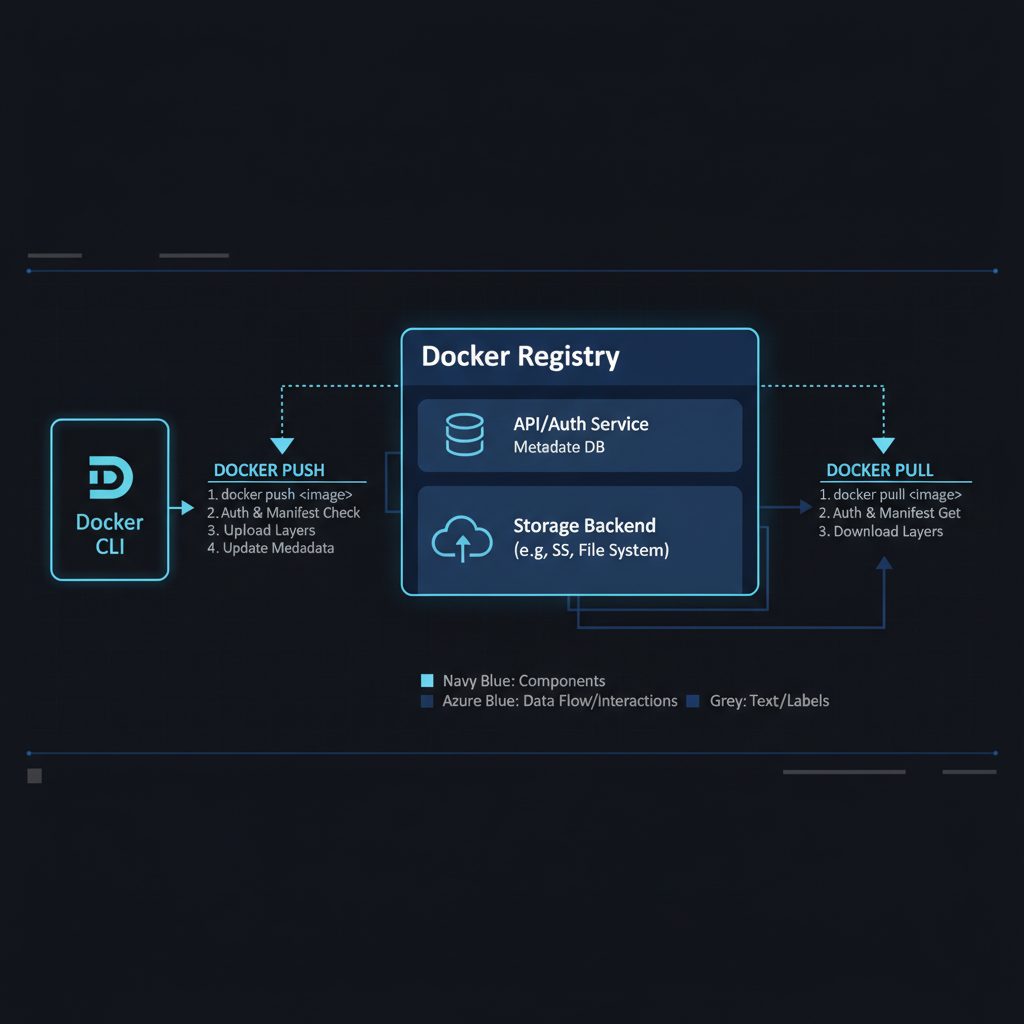
Understanding how a Docker Registry interacts with the Docker CLI is essential for troubleshooting and optimization. The core interaction consists of two main operations: push and pull.
The "Push" Operation
When you run docker push, the client authenticates, analyzes image layers to avoid redundant transfers, and uploads only the new layers before updating the image manifest.
The "Pull" Operation
When you run docker pull, the client requests the manifest, identifies missing layers, and downloads only what is necessary to assemble the final image locally.
💡 Pro Tip
This layer-based architecture is what makes Docker so efficient. By sharing common layers across multiple applications, you significantly reduce the storage and bandwidth required by your registry.
Registry Comparison: Choosing the Right Path
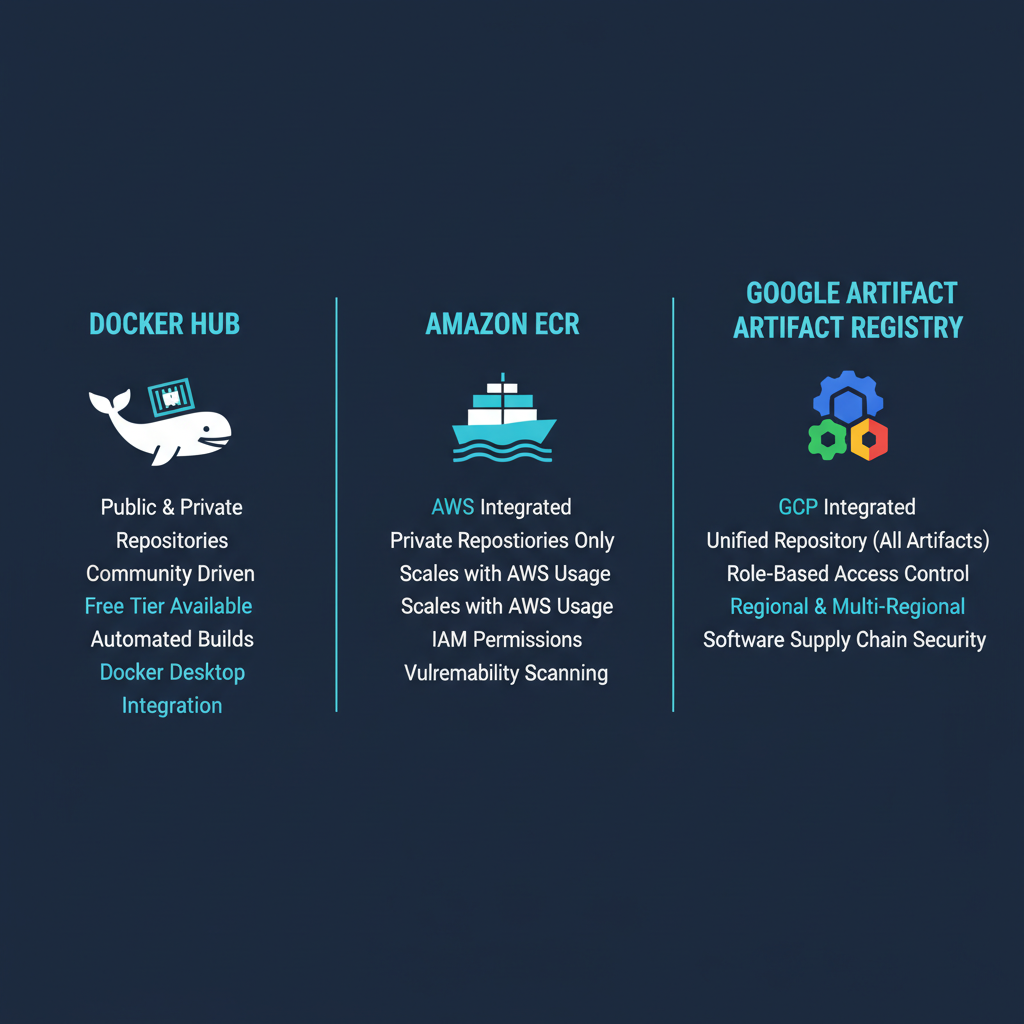
Choosing the right managed registry service is critical for a smooth DevOps experience. Here is a breakdown of the top players in 2026.
| Feature | Docker Hub | Amazon ECR | Google Artifact Registry |
|---|---|---|---|
| Best For | Open Source / Simple | Teams on AWS | Teams on GCP |
| Security | Basic scanning | Integrated IAM & KMS | Integrated IAM & Vulnerability |
| Speed | Global / Variable | Excellent (intra-AWS) | Excellent (intra-GCP) |
| Pricing | Subscription based | Pay-per-use | Pay-per-use |
| Artifacts | Images only | Images + Helm | Multi-format support |
Step-by-Step: Setting Up Your Private Docker Registry
For teams that want maximum control, self-hosting a Docker Registry is a common path. Docker provides an official registry image that makes this straightforward.
docker run -d -p 5000:5000 --name registry registry:2
While this is great for testing, a production registry MUST use HTTPS and storage persistence. To prevent data loss, always mount a host directory or an external storage bucket to /var/lib/registry.
Security Best Practices for Container Registries

Security is the most critical aspect of managing a Docker Registry. In 2026, with the rise of software supply chain attacks, you must be proactive in protecting your images.
- Use Robust Authentication: Never leave your registry open. Implement
htpasswdor OIDC. - Implement Image Scanning: Use tools like Trivy or Snyk to automatically scan every image for known CVEs.
- Use Immutable Tags: Avoid
latest. Use specific versions or git commit SHAs. - Garbage Collection: Regularly prune orphaned layers to save space and maintain performance.
Key Takeaways
- Always use HTTPS for production registries.
- Integrate image scanning into your CI/CD pipeline.
- Limit access using Role-Based Access Control (RBAC).
Conclusion
Mastering the Docker Registry is a fundamental step in building a professional containerized workflow. By choosing the right registry type, securing your images, and following best practices for tag management, you create a solid foundation for your applications to thrive.
At UseShift, we specialize in helping businesses optimize their technical infrastructure. From automating container deployments to architecting secure AI-driven workflows, we are your partner in the shift toward modern efficiency.
Ready to optimize your DevOps workflow?
Discuss your infrastructure roadmap with our expert team today.
Get a Free Audit